Skip to content
v2.13.0See what's new

Flight launcher, flight planner, airport map and add-on manager for X-Plane 12

The free flight companion for X-Plane 12. Route on real airways with SIDs and STARs, set weather and fuel at the gate, import SimBrief, launch the sim, and log every landing, on a live 3D globe of every X-Plane airport.

Join the Discord

Works on Windows, macOS & Linux · Requires X-Plane 12.4 or later

Plan routes with SIDs, STARs and SimBrief

Everything you do before the sim, in one window.

Browse airports, set up the flight, manage your add-ons, follow live traffic. Real screens from the app, working against real X-Plane data.

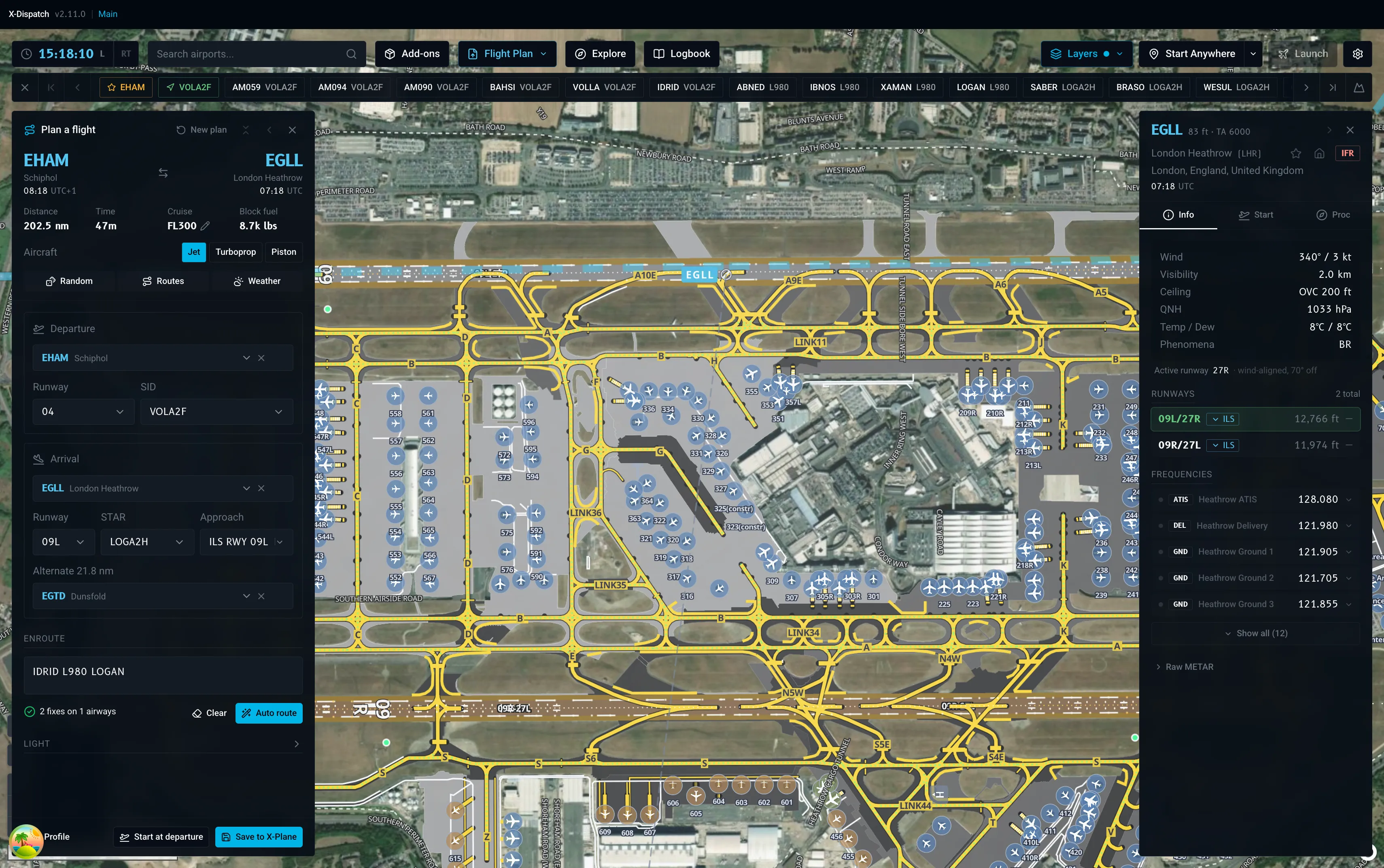
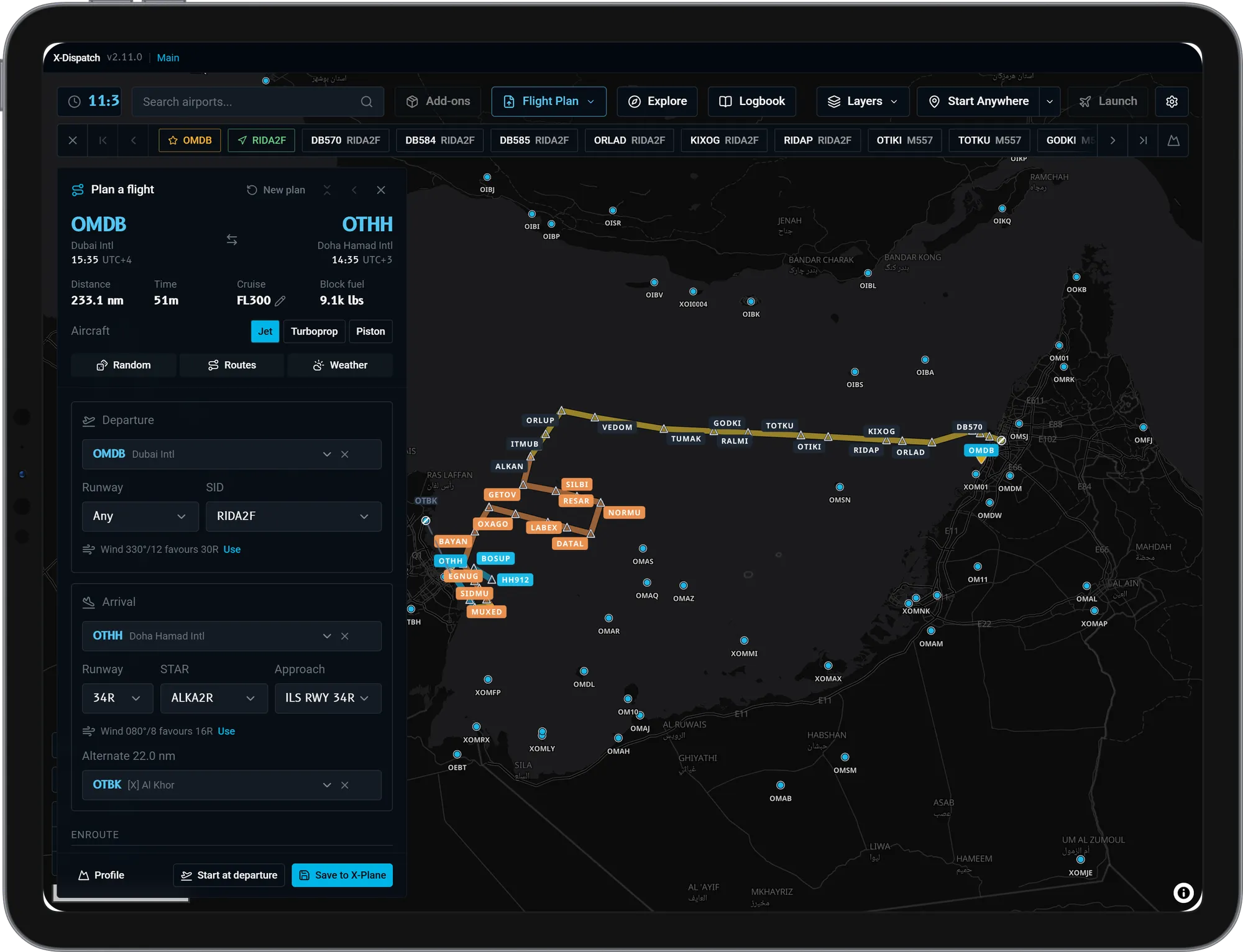
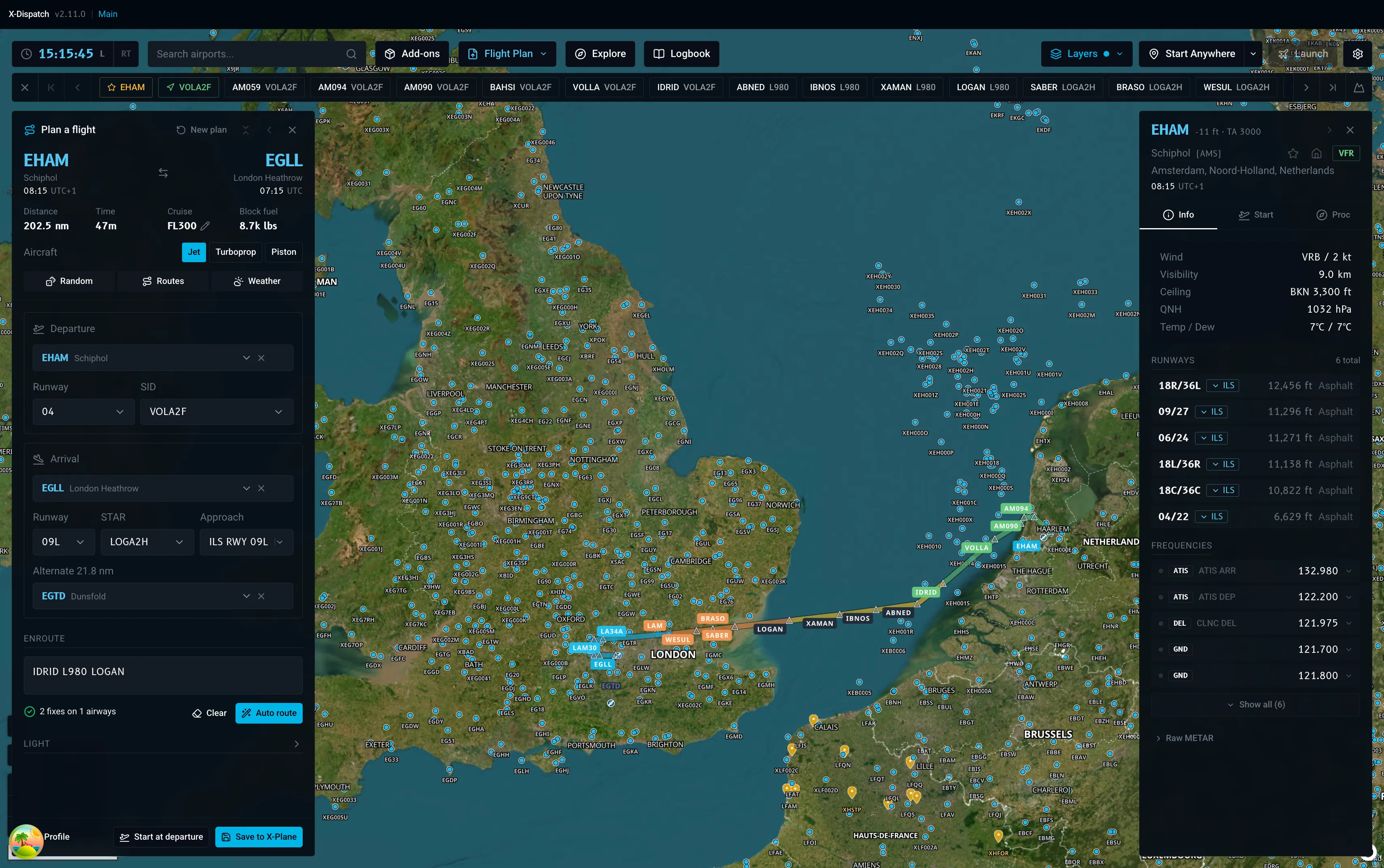
X-Dispatch: Plan the flight on real airways

Plan the flight on real airways

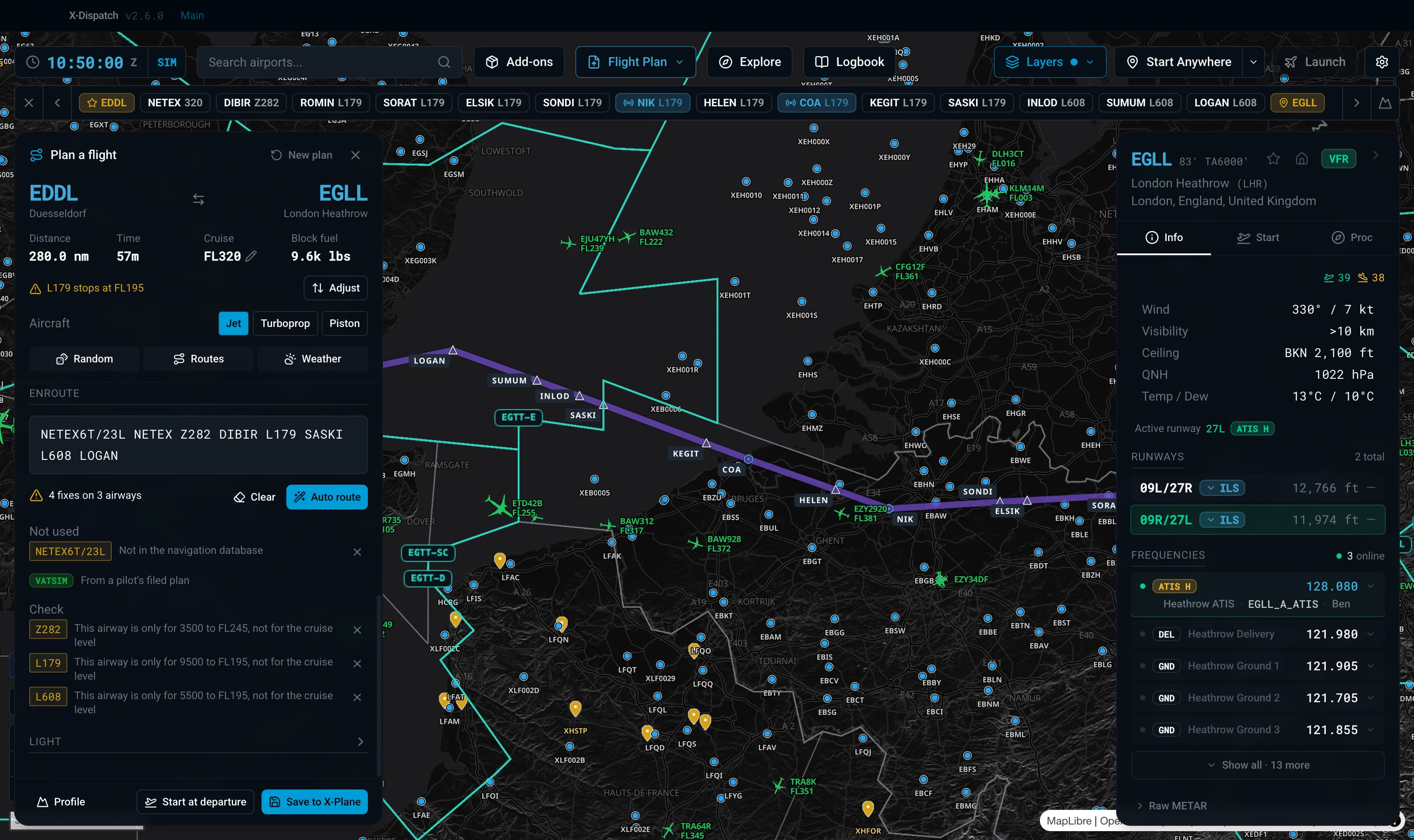
Pick departure and arrival, auto-route on real airways with SIDs and STARs, even across the North Atlantic Tracks. Edit the enroute string by hand and the map redraws as you type. Save straight to X-Plane as a .fms file.
X-Dispatch: Check the climb and descent against terrain

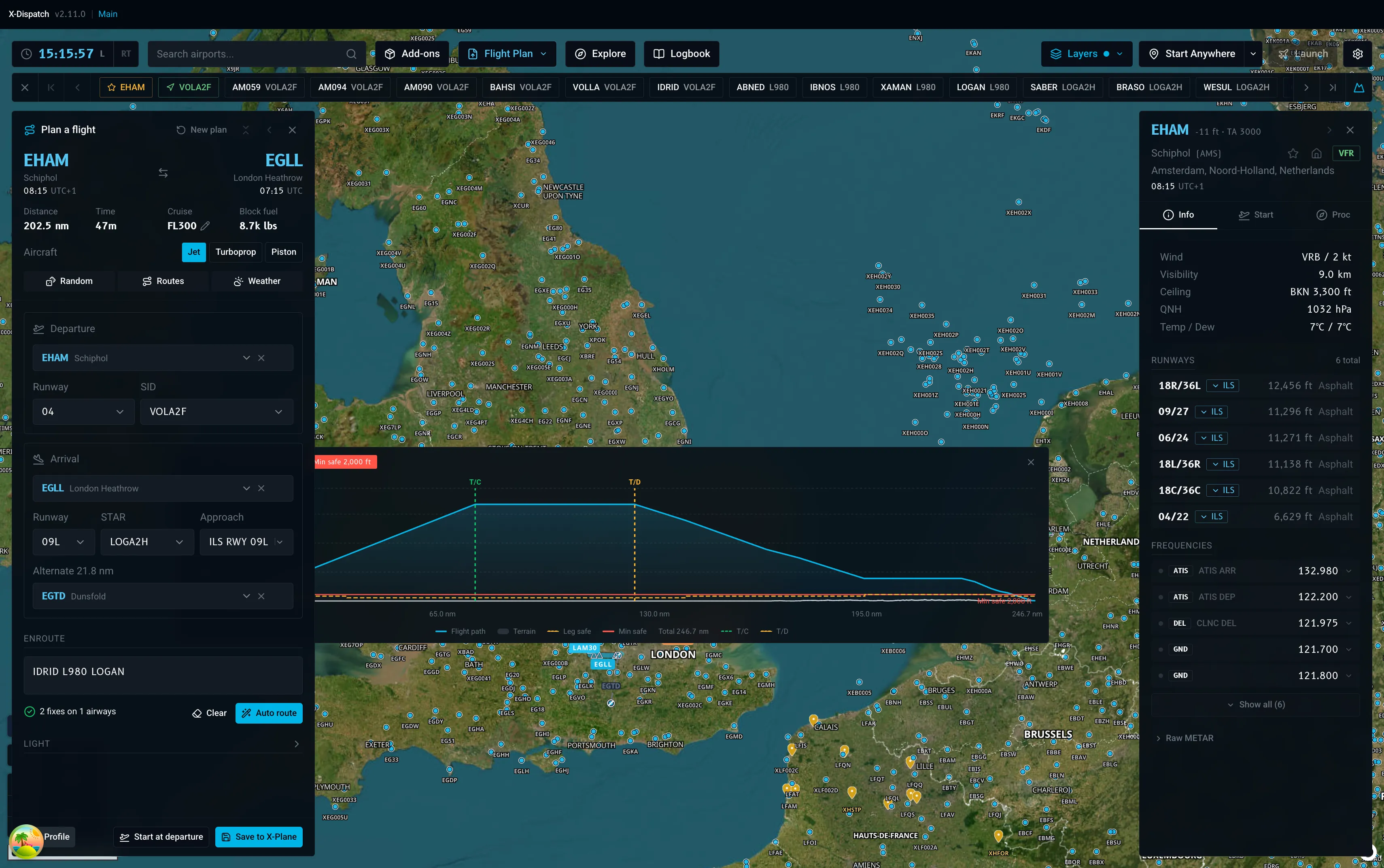
Check the climb and descent against terrain

Open the profile under the map and see the whole flight in one line: top of climb, top of descent, every altitude restriction from the SID and STAR, and the terrain under each leg with a minimum safe altitude. Hover a point and the map highlights where it is.

X-Dispatch: Don't know where to fly?

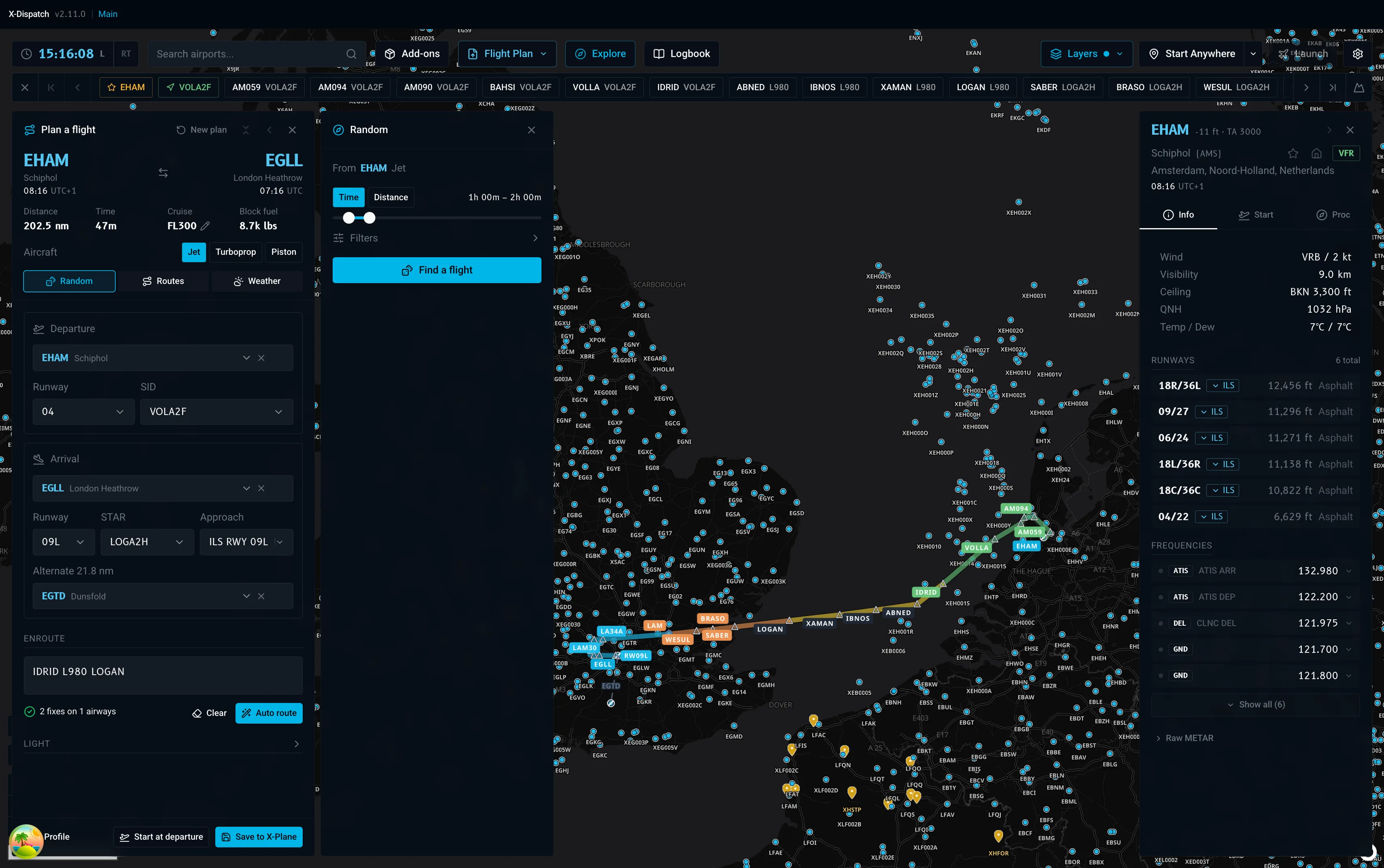
Don't know where to fly?

Explore picks five random destinations by flight time or distance, for jets, turboprops or pistons, domestic or across a border. Browse 41 featured routes, or let the Weather tab find airports with snow, fog, storms or strong wind right now, from the live METAR feed.

Weather you can see on the ground

Rain, snow, fog, and wind blow across the airport straight from the live METAR. At night the airfield lights come on: runway, taxiway, and approach lighting, including the sequenced flashers on final.

X-Dispatch: Your aircraft, live on the map

Your aircraft, live on the map

While X-Plane is running, your aircraft silhouette follows you from the globe down to the taxiway, with a line from the nose showing where you will be in one minute. The Flight Strip keeps speed, altitude, heading, wind, COM1 and QNH on screen, on the map or in its own window over X-Plane. Scroll over a value to turn the autopilot or radio knob in the sim, and lock the strip so clicks pass through.

X-Dispatch: Every landing, rated

Every landing, rated

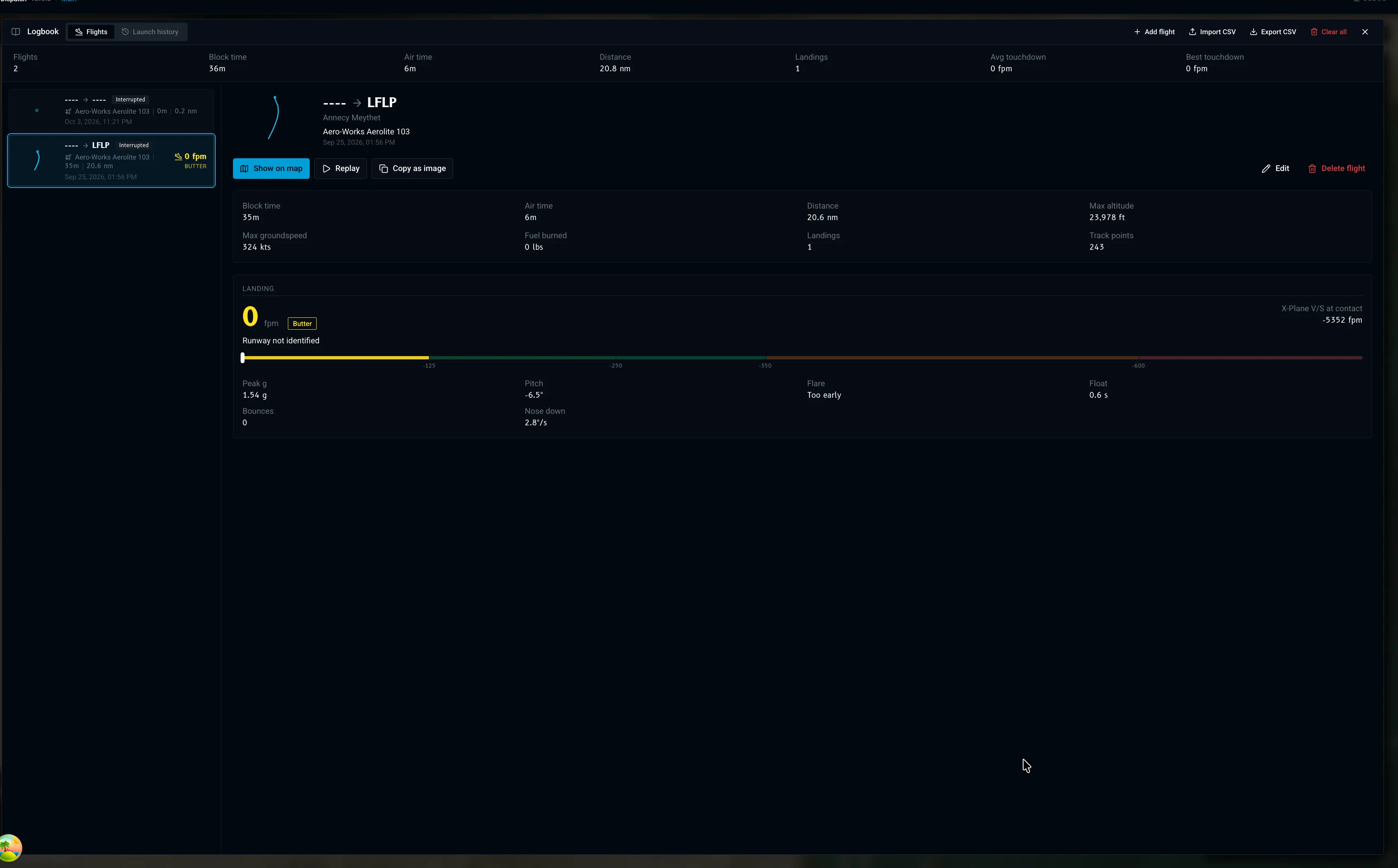
X-Dispatch records every flight on its own: phases, trail, block and air time, distance and fuel. At touchdown you get a landing report with the rate, peak g, flare, float, bounces and centreline offset, plus a card you can copy and share. Replay the flight on the map, edit the logbook, and export it as CSV.

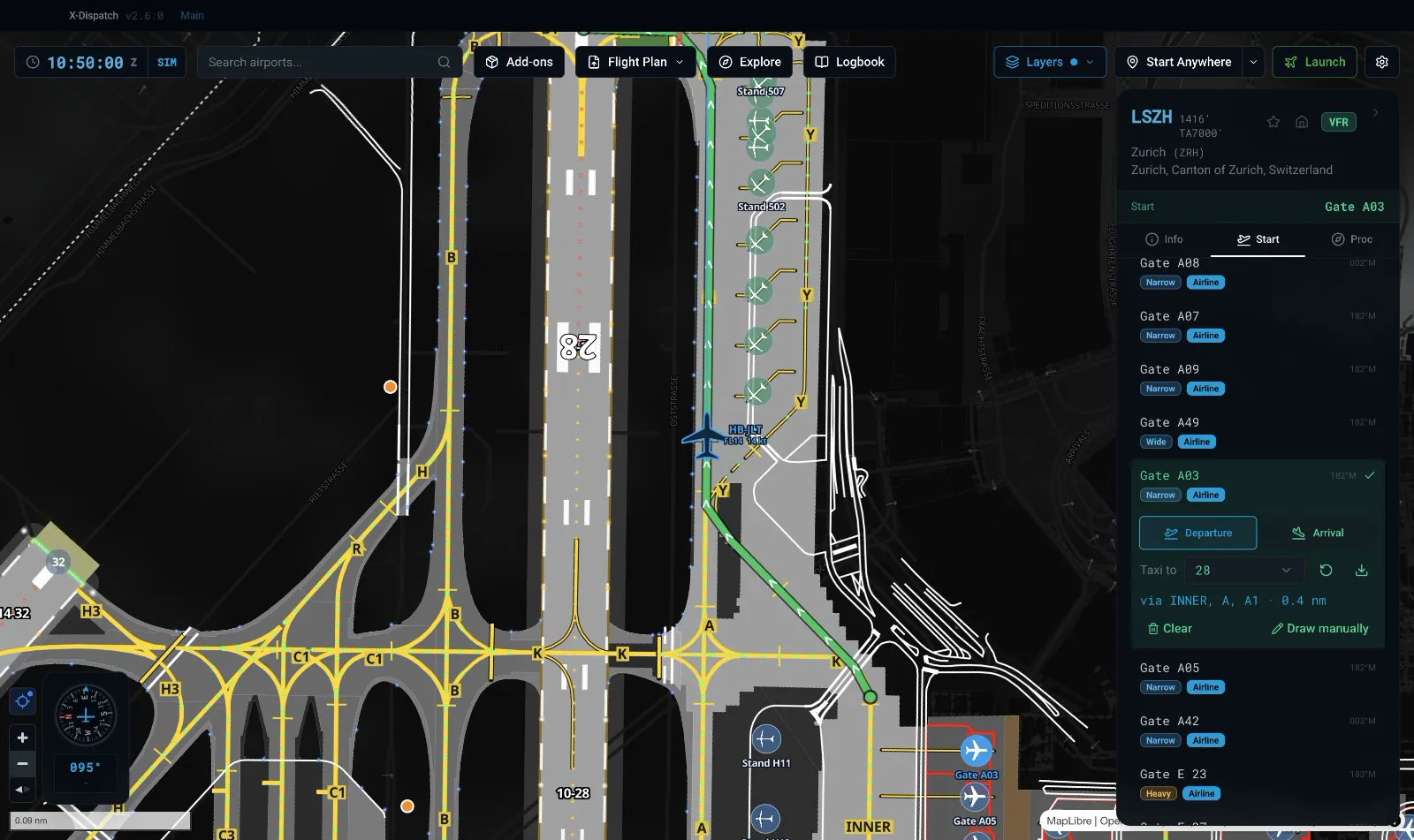
Taxi with guidance in the Flight Strip

Plan the route from your gate to the runway, then press the map button on the Flight Strip: a heading-up map of the airport opens under it with the route, taxiway labels and your aircraft. It tells you the next turn, how far away it is and where to hold short. Set its opacity to taste, and the lock button pins the window in place and lets clicks pass through, so it never gets between you and the cockpit.

X-Dispatch: Fly online with VATSIM and IVAO

Fly online with VATSIM and IVAO

Live traffic, sectors and staffed airports on the map, with a ring on the airport dot and a letter for every online position. Click a pilot to see their route, then hand their filed plan to the planner with one button.

X-Dispatch: See who is on frequency

See who is on frequency

Staffed airports show every online position as a letter on the airport dot: delivery, ground, tower, approach. The info panel lists each one with its frequency, the controller and the live ATIS, and VATSIM sectors are drawn on the map, so you know who to call before you push back.

Search any ICAO. Jump there.

35,000 X-Plane airports on a 3D globe, with nav aids, airspaces, and live weather underneath. Toggle VATSIM and IVAO traffic on top. Star your favorites, pick a home airport, and it gets its own marker.

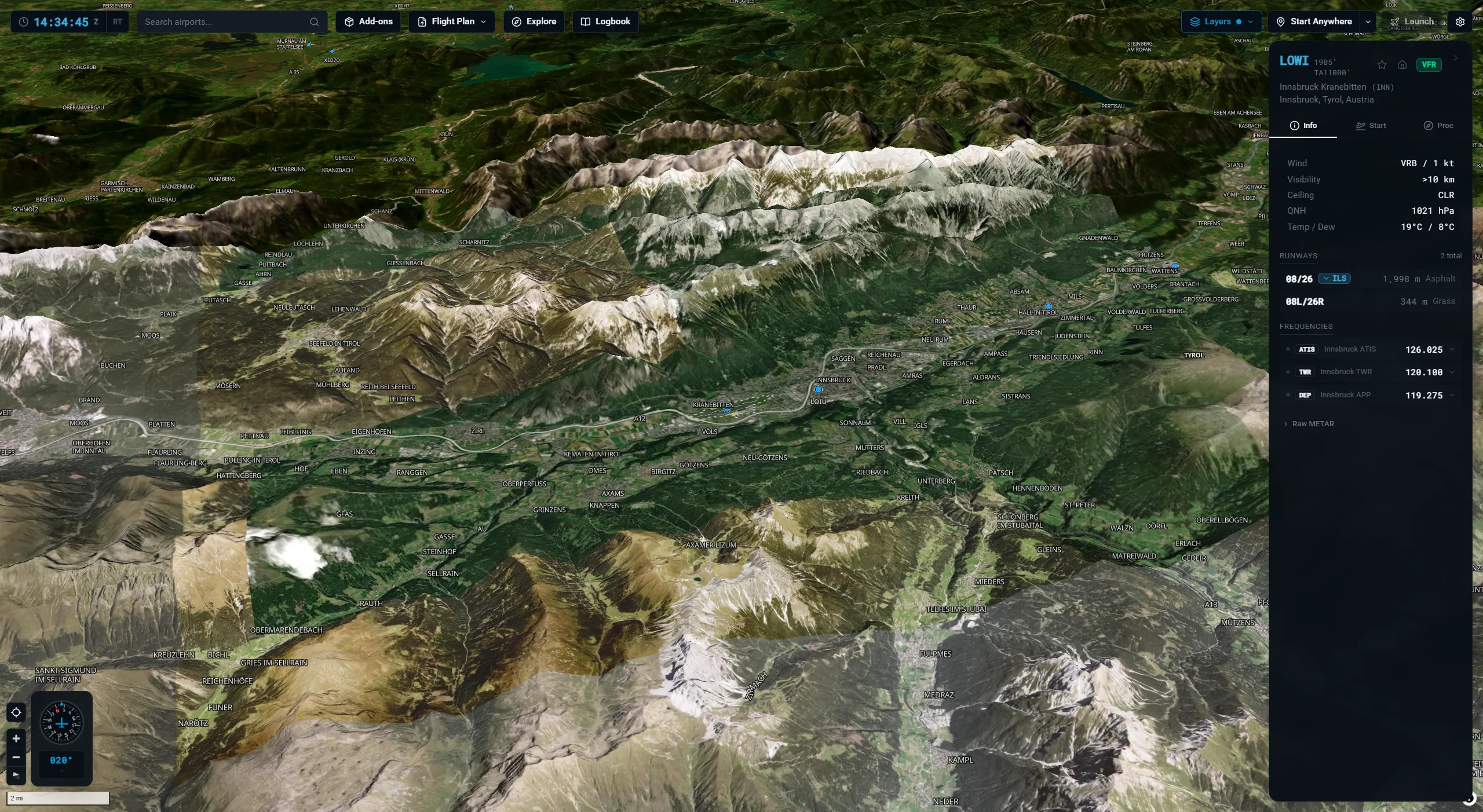
X-Dispatch: 3D terrain

3D terrain

Hillshade and real elevation under the map, so mountain airports like Innsbruck and Bolzano read the way they should. ILS glide slopes are drawn in 3D above the runway.

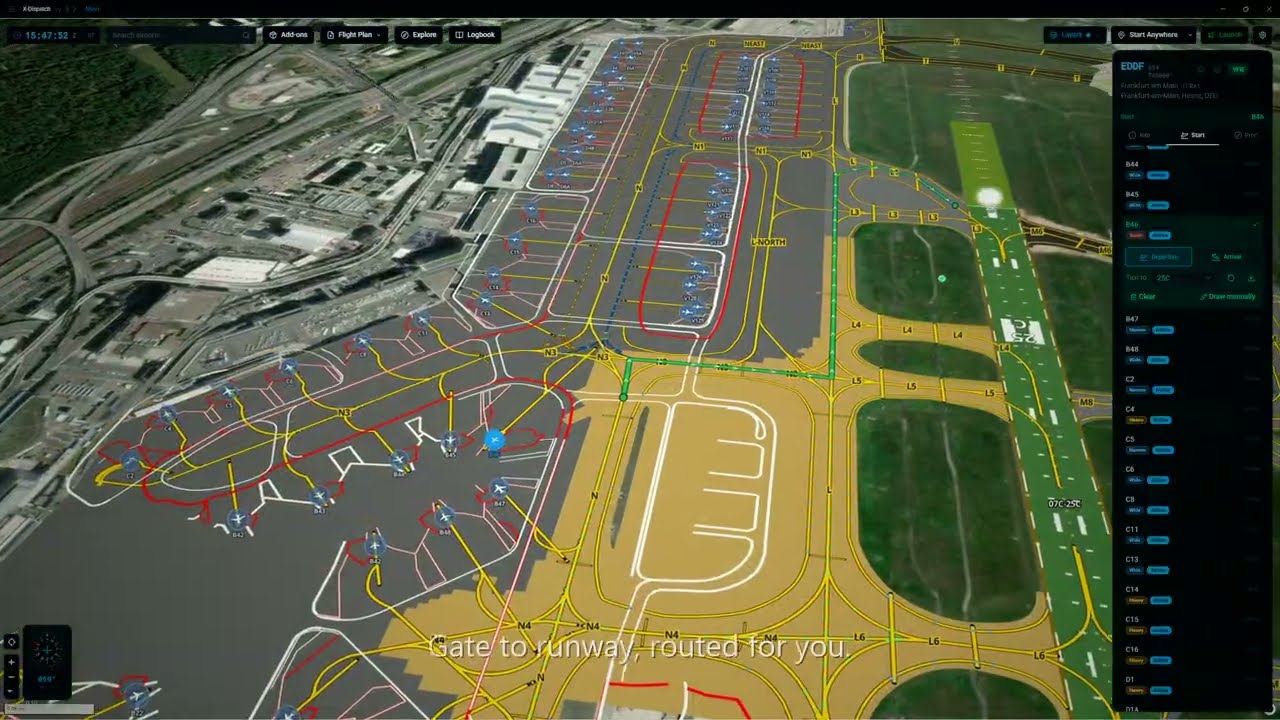
X-Dispatch: Real airport diagrams

Real airport diagrams

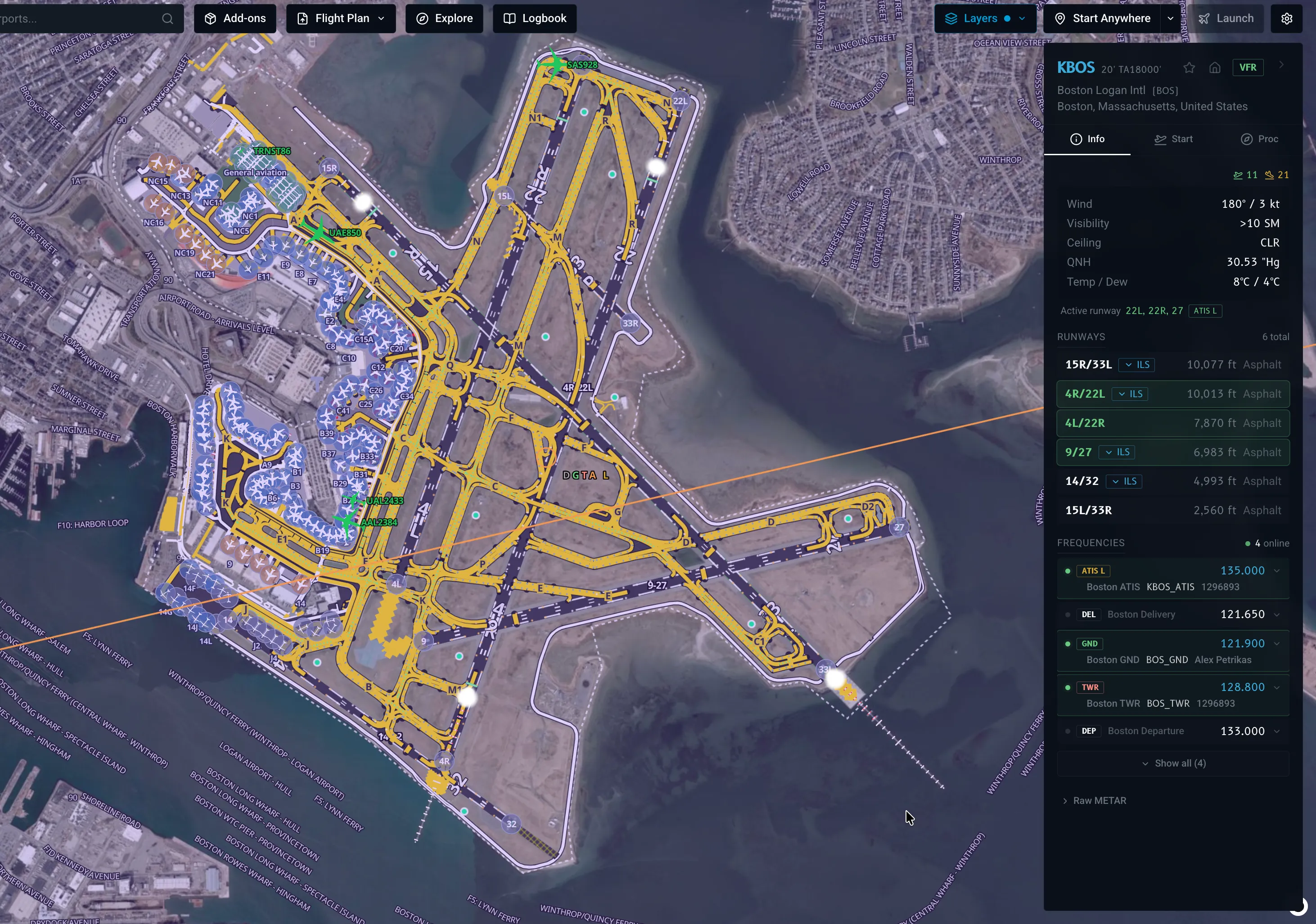
Layouts pulled straight from your X-Plane install. Runways, taxiways, gates, painted lines, lighting, custom scenery. Click any frequency in the info panel and it tunes COM1 or COM2 in the sim.

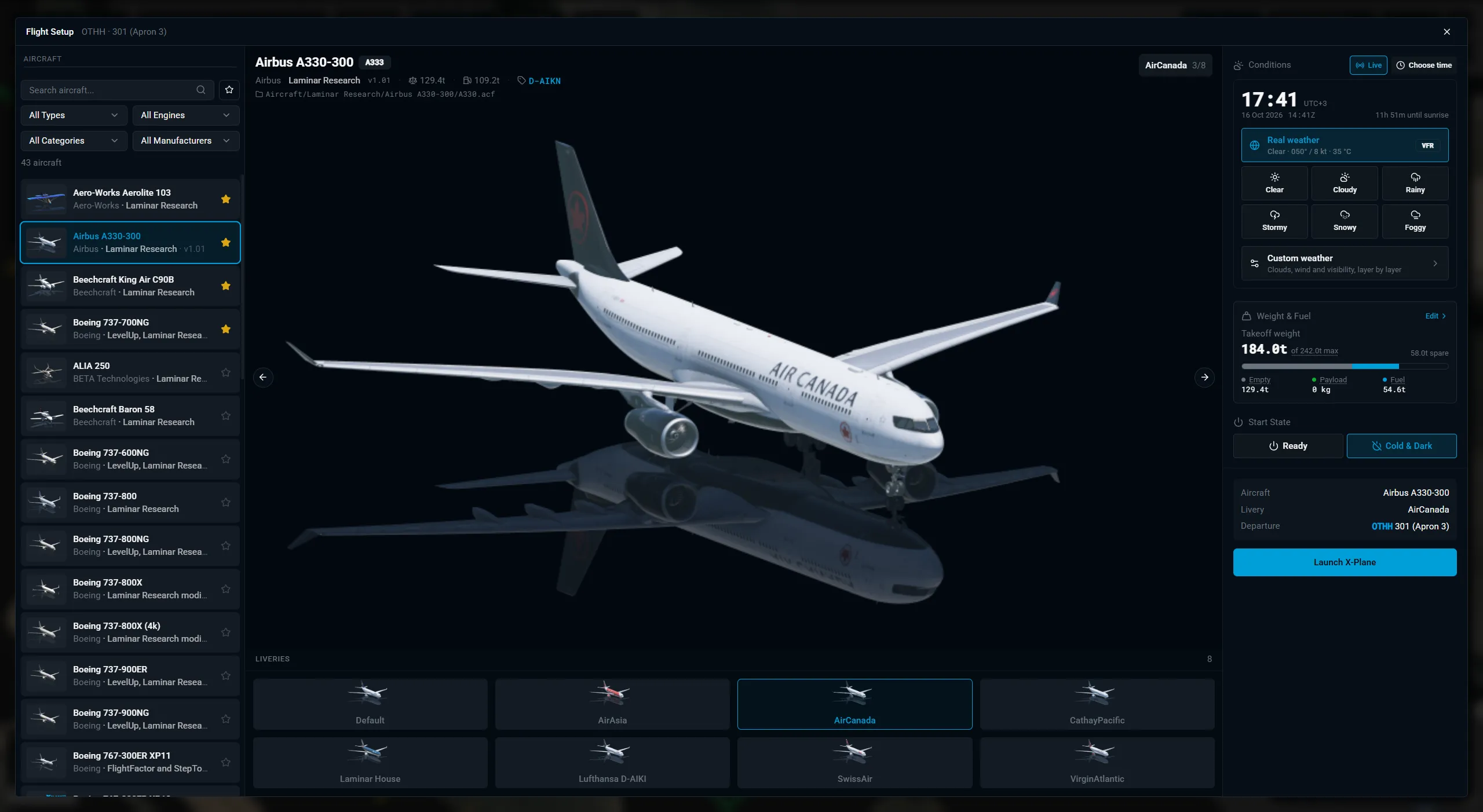
X-Dispatch: Configure the flight at the gate

Configure the flight at the gate

Aircraft, livery, fuel, payload, weather, time of day. All on sliders. Set up the whole flight before the sim opens.

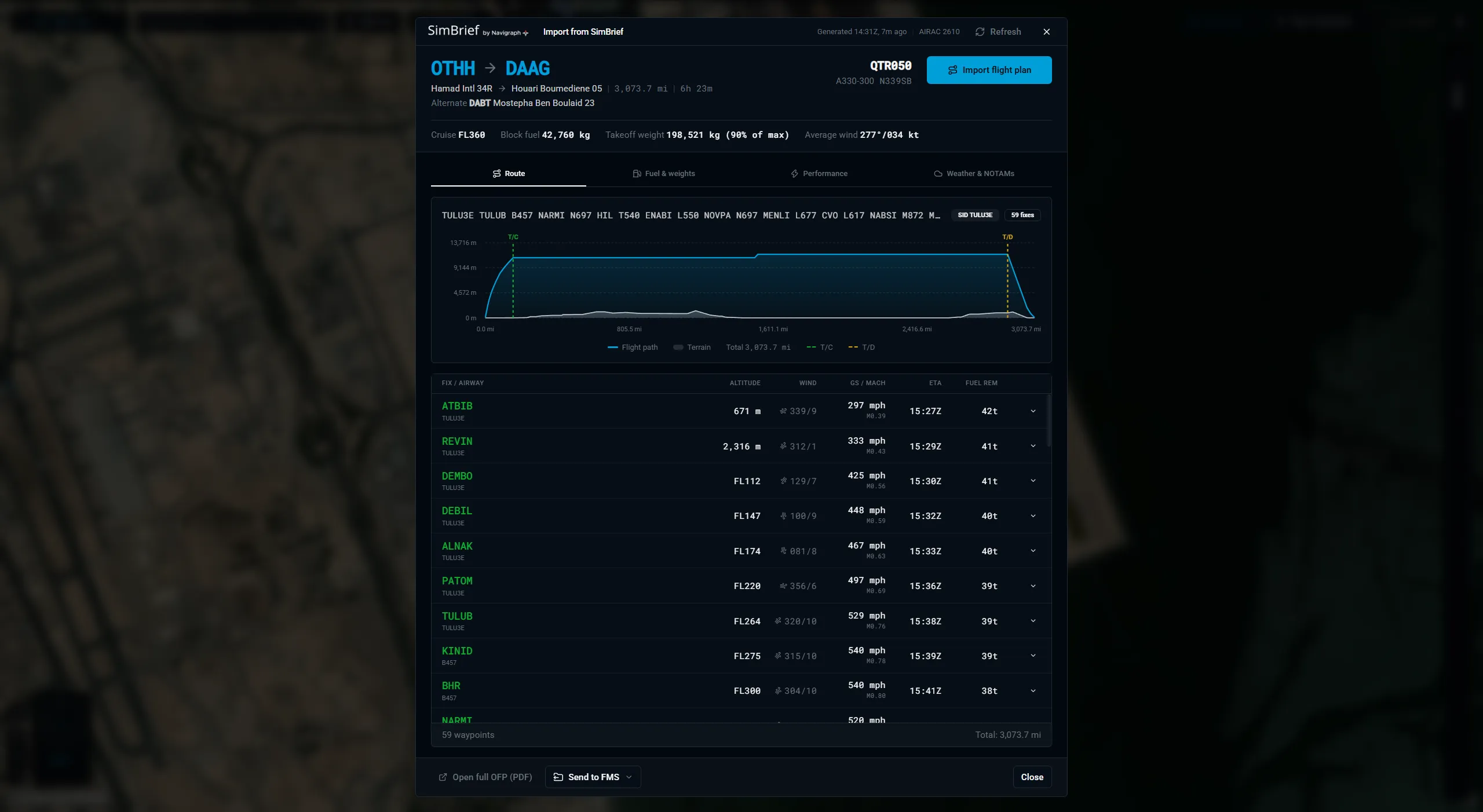
X-Dispatch: SimBrief, one click in

SimBrief, one click in

Fetch the latest OFP. Review the route, perf, weights, and fuel. Drop the FMS file straight into your sim folder.

X-Dispatch: Your tablet is a second screen

Your tablet is a second screen

Switch on Tablet access, scan the QR code, and X-Dispatch opens in the browser on your iPad or a second PC on the same network. Your computer keeps doing the work. The flight plan stays in sync, so you can plan on the tablet and launch from the desk.

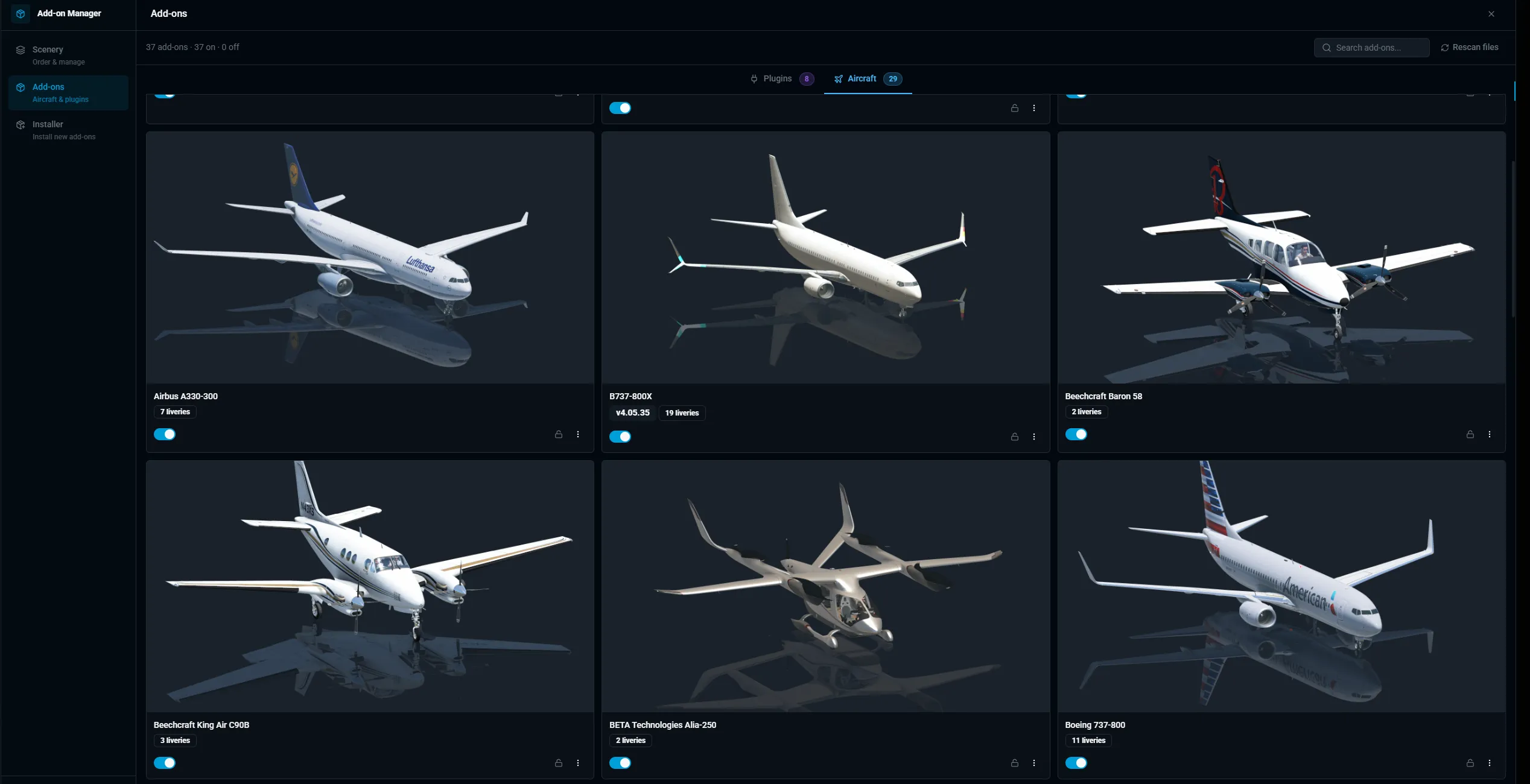
X-Dispatch: Add-ons in one place

Add-ons in one place

Drop in a .zip, .7z or .rar, a split download, a password-protected archive or a plain folder. A pack with an aircraft, its plugins and a scenery is listed as separate add-ons with a tick box each, and one button installs them where they belong. Liveries go to the right aircraft, scenery priority sorts itself, and missing libraries are spotted with a download link.

Everything X-Dispatch does.

From the first airport search to the last landing, and the add-ons in between.

  1. Flight planner

    Real airways, real procedures, from your own nav data.

    Read the manual
    • Auto route on airways with SIDs and STARs, tuned for jet, turboprop or piston.
    • Type the route as filed. The map redraws as you type and flags one-way airways and level limits.
    • Runway suggested from the live wind at departure and arrival, one click to apply.
    • Today's North Atlantic Tracks from the FAA, picked by hand or by the router.
    • Cruise level, alternate and block fuel estimated for you. Swap builds the return leg.
    • Vertical profile with climb, cruise, descent, altitude restrictions and terrain under every leg.
    • Open .fms files from SimBrief, Little Navmap, FlyCharts or an aircraft FMC. Save FMC-friendly .fms back.
    • Explore: five random destinations by flight time, 41 featured routes, and live airports with snow, fog or storms right now.
    • Range rings by aircraft category. Local time with UTC offset at departure and arrival.
    • Compact view and fold-to-rail so the planner stays out of the way of the map.
  2. Flight Strip

    A live cockpit readout that floats over X-Plane.

    Read the manual
    • IAS, ground speed, Mach, altitude and AGL, vertical speed, heading, track, wind and OAT.
    • COM1 active and standby, QNH in hPa and inHg, autopilot targets in magenta.
    • Scroll over a value to turn the knob: autopilot speed, altitude, vertical speed, heading, COM1 standby and baro. Works with the Zibo 737 and FlightFactor 777.
    • Pop it out, keep it on top, lock it so clicks pass through to the sim.
    • Opens when X-Plane connects, hides when it leaves. Reorder readouts by drag, set size and opacity.
    • Taxi guidance on the ground: next turn, distance, hold short, runway crossings and an off-route warning.
    • Heading-up taxi map under the strip, with your route, taxiway labels and your aircraft.
  3. Taxi routing

    Gate to holding point, planned on the real layout.

    Read the manual
    • Automatic route from stand to the hold short line, or from the runway exit to your stand.
    • Respects stand size and taxiway width, crosses runways only when it must, follows your planned runways.
    • Drag to reshape, snapping to taxiways. Double-click removes a point. Undo one step at a time.
    • Written for the Follow the Greens plugin automatically.
    • The route trims itself as you taxi and the map follows you.
  4. Airports

    Every X-Plane airport, drawn from your own install.

    Read the manual
    • 35,000 airports. Search any ICAO, star favourites, set a home airport that opens on startup.
    • Filter by type, surface, country, runway count, IATA code, custom scenery, or airports with procedures only.
    • Diagrams from apt.dat and custom scenery: pavements, markings, gates with sizes, helipads, windsocks, tower.
    • Runway, taxiway and approach lighting that follows day and night, with sequenced flashers.
    • Live METAR decoded: flight category, active runway, head, tail and crosswind. Local time at the field.
    • Click a frequency to tune COM1 or COM2 in the sim.
    • SIDs, STARs and approaches drawn on the map, holds as racetracks.
    • Scenery Gateway notice when a newer airport is available, with the artist credit.
  5. Map and layers

    A 3D globe with the weather and the terrain on it.

    Read the manual
    • Live weather radar with frame stepping, and infrared satellite clouds.
    • Rain, snow, fog and wind blowing across the airport from the METAR.
    • 3D terrain, hillshade, contour lines and elevation under the cursor.
    • Sun-lit sky, day and night, city lights, optionally following X-Plane time.
    • Navaids, ILS beams in 3D, airspaces and FIRs, NAT tracks.
    • Your aircraft as its silhouette, with trail, shadow and a one-minute vector.
    • X-Plane AI and multiplayer traffic from the sim.
    • Four basemaps plus your own tile URL. Labels in your language, by category.
    • Measure tool with draggable points that snap to navaids. Right-click to start here, copy coordinates, read terrain height.
  6. Online networks

    VATSIM and IVAO, live on the same globe.

    Read the manual
    • Every online pilot, with altitude, speed, route flown and route remaining.
    • Staffed airports get a ring and a letter per position. Frequencies and ATIS in the panel.
    • VATSIM controller sectors drawn on the map.
    • Open a pilot's card and hand their filed route to the planner with one button.
    • Explore uses the VATSIM METAR feed to find weather worth flying in.
  7. Flight setup and launch

    The whole flight configured before the sim opens.

    Read the manual
    • Aircraft search with favourites, engine filter, previews, specs and a livery carousel.
    • Start at a gate, ramp, runway or helipad. Or Start Anywhere: in the air with speed presets, on a carrier, or at typed coordinates.
    • Time of day on a sun arc, live or custom. Cold and dark or engines running.
    • Weather presets, or build your own cloud and wind layers with gusts and visibility.
    • Fuel per tank and payload, with takeoff weight checked against MTOW.
    • Cold start X-Plane, or Change Flight while it is already running through the 12.4 Web API.
    • Several X-Plane installs, launch arguments, environment variables and the API port, all in Settings.
    • Companion apps launch with the sim. The X-Plane log viewer flags warnings and errors.
  8. SimBrief

    Your OFP, on the map and in the FMS.

    Read the manual
    • Fetch the latest OFP by username or Pilot ID.
    • Route and navlog, fuel and weights, takeoff and landing performance, weather, NOTAMs and SIGMETs.
    • The route draws on the globe with SID, STAR, airways and tracks in their own colours.
    • Import into the planner to edit it.
    • Export targets for X-Plane 12 and 11, ToLiss, Zibo, FlightFactor, IXEG, JARDesign, Level-D, PMDG, iniBuilds, MilViz, Garmin GTN, VATSIM FPL and the PDF briefing. Send all at once.
  9. Logbook and landing report

    Every flight recorded, every landing rated.

    Read the manual
    • Flight phases, trail, block and air time, distance, max altitude and speed, fuel burned.
    • Touchdown rate, peak g, flare, float, bounces, centreline offset and distance past the threshold.
    • A landing card you can copy and share. Zoom to the touchdown point.
    • Replay any flight on the map with play, speed and follow.
    • Edit flights, add one by hand, see totals. Export and import CSV.
    • Launch history alongside the flights.
  10. Add-on manager

    Install anything. Keep scenery in order.

    Read the manual
    • Drop a .zip, .7z or .rar, a split download, an archive inside an archive, a password-protected one, or a plain folder.
    • A package with an aircraft, its plugins and a scenery is listed as separate add-ons with a tick box each.
    • See what an install replaces. Overwrite, or clean install with liveries and preferences kept.
    • Liveries routed to the right aircraft: Zibo, ToLiss, FlightFactor, LevelUp, X-Crafts, Felis, Rotate.
    • Nav data recognised and sent to GNS430, UFMC or FlightFactor targets. Warns when FlyWithLua is missing.
    • Enable, disable, lock and delete aircraft and plugins. Update checks for SkunkCrafts add-ons.
    • Livery browser and FlyWithLua script manager.
    • Scenery priority by drag or Auto-Sort, with automatic backups and restore.
    • Missing scenery libraries detected, with download links.
  11. Everywhere else

    The small things that add up.

    Read the manual
    • Tablet access: open X-Dispatch on an iPad or a second PC over your network, paired by QR code, with the plan synced.
    • Ten languages, light and dark themes, font size and zoom.
    • Units per quantity, coordinate formats, magnetic or true course.
    • Navigraph or default nav data detected, with the AIRAC cycle and whether it has expired.
    • xdispatch:// links for airports, routes and SimBrief. .fms files open from the OS.
    • Keyboard shortcuts for everything. Windows, macOS and Linux, with automatic updates and an opt-in beta channel.
    • No subscription, no account.

What X-Plane pilots say.

“I no longer start X-Plane. I now start X-Dispatch.”
Marespi/on X-Plane.org
“Hands down the best add-on for X-Plane.”
Haui/on X-Plane.org
“The best thing that has happened in the X-Plane 12 community for me.”
luckythastriker/on X-Plane.org
“The one-stop tool every simmer needs.”
DZ-Aviation/on Discord
“Best thing to happen to X-Plane since Map Enhancement.”
lantern53/on X-Plane.org
“I cannot believe what this developer has achieved.”
Durin/on X-Plane.org

Ready when you are. Free, no account.

Works on Windows, macOS & Linux · Requires X-Plane 12.4 or later